 Get the app
 PDF Editor for Android
Short answer
PDFMason is an Android PDF editor that changes the original text inside a PDF instead of layering a text box on top. It works entirely on your device — no upload, no account — and also finds and replaces text across a document, compares the text of two files, and protects or unlocks them with a password. The app is in early access: every feature is free during this period.
PDFMason is a PDF editor for Android that runs entirely on the phone. Its document tools rewrite existing PDF text and process files locally — 26 tools in five groups, from text editing, OCR and Office conversion to find and replace, comparison, redaction and password protection. The app is available on Google Play; optional usage statistics are separate from document processing.

What it does
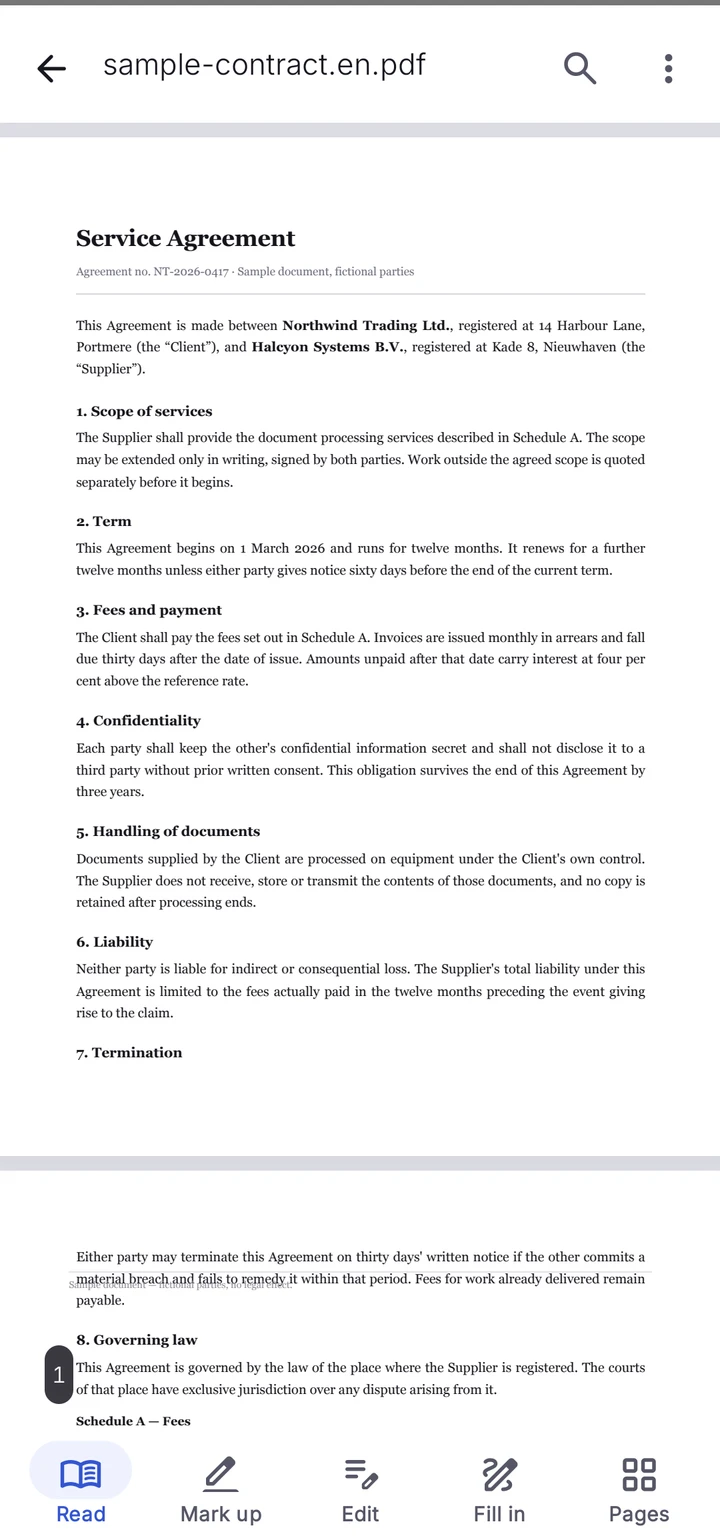
PDFMason covers the whole editing loop on one phone. Nothing below needs a server, a second device, or a re-upload. The tools tab lists 26 entries in five groups — Edit & sign, Convert, Pages, Smart, Security & privacy — and everything below is included: text editing, find and replace, comparison, OCR, PDF-to-Office, password tools and redaction sit right next to reading, annotation, page tools and compression.
Reading and diagnosis
Open PDFs from the system picker, including password-protected files: enter the password and the file opens like any other. On open, a built-in diagnosis classifies every page as native text, scanned, mixed, vectorized text, or empty, detects hidden OCR layers, counts text columns, and grades the document into one of five editability levels with a concrete reason. Full-text search highlights hits with the surrounding line.
- Five-tier editability rating, computed per document, with one of nine specific reasons.
- Document permissions (modify, copy, print) are read and respected — the app disables what the file disallows instead of bypassing it.
- Search runs progressively on long documents and says so when results are truncated.
Text editing of existing content
Tap a text block to select it whole, or long-press a word and drag the handles to extend the selection character by character. Replace an entire block or only the selected fragment, insert or delete blocks, and move or resize text frames. Font family, size and color are editable on the text you touch. Before you commit, the app renders a preview of the written result; until you confirm, nothing is stored. When the replacement is longer than the frame, the app offers three outcomes: shrink the font to a suggested scale that fits exactly, truncate the text, or expand the frame. Where the edit qualifies — same line, same object, a font that can write it — only the changed run is rewritten and untouched characters keep their original positions, fonts and sizes. The result stays real text — selectable, searchable, one paragraph.
This is the part almost no Android editor ships: most stamp a new text box over the old line and leave two overlapping texts in the file.
Annotation
- Highlight in six colors at 45% opacity.
- Underline and strikethrough, applied line by line so they follow the text.
- Handwritten ink in eight colors; strokes merge into a single undo step.
- Sticky notes and free text boxes.
- Flattened export when annotations must be burned into the page.
Images
Insert, replace, delete, move, scale and rotate images, and adjust their stacking order relative to text and other images. Selection disambiguates by z-order, so an image sitting behind text is still reachable.
Page tools
Delete pages, reorder them by drag in a grid, rotate in 90-degree steps, duplicate, insert blank pages, insert pages from another PDF (which may carry its own password), insert an image as a full page, and crop. The app states plainly that cropping only hides content — the cropped object stays in the file. Header & footer stamps page numbers or Bates-style labels with position and range controls, and Split down the middle cuts two-up scans into single pages. Make PDF permanent flattens a file in two modes: annotations and forms are burned in while the text stays selectable, or the whole page becomes an image — each mode says what it costs before you run it. Repair PDF rebuilds damaged files best-effort and names what it has to drop, such as form fields, annotations, bookmarks and signatures.
Forms and signatures
Fill text fields, tick checkboxes and mark radio buttons — all three are written into the file and survive saving, so other readers see the filled form. Non-Latin text is committed with a shaped font subset embedded at save, which is what lets Arabic, Hebrew, CJK and other scripts appear correctly in readers other than this one. Text editing of page content is a separate boundary: it covers Latin, CJK, Arabic and Hebrew, and refuses Indic scripts and vertical text rather than writing them wrong. A handwritten signature can be placed — a drawing of your signature, not a cryptographic certificate.
Merge, split and OCR
Merge multiple PDFs with per-file passwords and optional page ranges. Split by range, by picked pages, or one file per page. OCR runs on the phone in two output modes: a searchable layer that keeps the scanned image, or editable mode that replaces recognized pixels with real text. English and Chinese are recognized automatically, picking the better result page by page, and each recognized line is classified as printed or handwritten on the device.
Find and replace, compare
Find and replace works across the whole document on the phone. Enter a word or phrase, narrow it with case and whole-word matching, and review every hit before anything changes: replace or skip each match one by one, restore a skipped one, or apply to all the remaining matches. The match list is frozen against the original document, so results do not drift as edits land. The saved result is a new copy — the original file is untouched. Pages a batch edit cannot reach honestly, such as scans or low-confidence OCR pages, are listed as skipped rather than edited blindly, and a replacement that would overflow its frame is flagged instead of silently shrunk.
Compare text takes two files — an old version and a new one, either of which can be swapped — and reports what changed in the words: added, deleted and modified lines counted, filtered by type, and navigated hit by hit with character-level highlighting. The comparison is aligned across pages, so inserting a page does not shift every later difference. It reads the text layer, not the pixels: images and formatting-only changes are out of scope, and a file with no extractable text is sent to OCR first. The full workflow is on find and replace PDF text on Android, and the comparison details are on compare PDF text on Android.
Camera scanning
On devices that have Google Play services, a camera and enough free memory, the app can scan documents with the camera: pages are captured, cropped and perspective-corrected automatically, in batches, and saved as a PDF. The scan entry comes from Google’s document scanner, so it appears only when those conditions hold — on other devices it stays hidden, and photos already in the gallery can be imported and turned into a PDF instead. A camera scan is a picture PDF; to search or edit its text, run OCR on it afterwards.
Security and privacy tools
Set password encrypts a copy with AES-256 and can also forbid printing or copying; the result is verified independently, and the app warns up front that a forgotten password cannot be recovered. Remove password does the reverse with a password you know: wrong passwords are caught, the unlocked copy is saved beside the locked original, and files without a password are reported as such. Neither tool bypasses anything — no password, no legitimate route. Watermark stamps text across pages. Document properties shows and clears metadata such as the author, producer and creation dates.
Auto-redact finds candidates for you, from explicit rules: phone numbers and ID numbers for chosen regions, international bank account numbers, bank cards, email addresses, web addresses, and any custom text you add. Every candidate is listed with its context, page and a highlighted preview, and you tick what to remove before anything happens — matches without reliable positions are counted but never marked on their own. Confirming runs the same pipeline as manual redaction: the content is deleted from the file, hidden data is swept, and the copy is verified before it is saved. Rules help you find; you decide what goes.
Compression
Two levels, described by what they cost rather than by a percentage. Recommended resamples photographs for screen reading and still prints acceptably. Smallest is noticeably smaller and softens photographs close up. Text is not touched at either level — only images are resampled — so a compressed document stays selectable and searchable.
The size of the file and an estimate of what it will become are both shown before you start, so you can decide without running it. Afterwards you get the real number and the percentage saved. When the saving turns out to be small, the app says so and recommends not keeping the copy: a file that is two per cent smaller and re-encoded is a worse file than the one you had. The compressed copy is written beside the original, which is left alone.
Convert to Word, Excel and PowerPoint
Conversion produces a real .docx, .xlsx or .pptx and runs entirely on the phone; nothing is uploaded to a conversion service. Word offers two modes. Editable first recovers paragraphs, lists and tables in reading order so you can keep working in them, and the layout may shift a little. Keep the layout reproduces the page as it looks — a scanned page arrives as a picture of itself and its text cannot be edited, which is also the mode that carries handwriting across instead of dropping it.
Word conversion can recognize scanned pages on the way through, so a scan becomes an editable document in one pass. Excel detects tables that have no ruled borders, which is where most PDF-to-spreadsheet tools give up. Progress is reported by stage and by page — reading, recognising, analysing, writing — rather than as an indeterminate spinner.
When it finishes, the result is graded per page: fully editable, backgrounds flattened, or recognized text over an image. A page that could only reach the third grade is named as such, and the app says when that is a limitation of the source document rather than of the conversion. You are told what you got, not just that it finished.
Hide private info
Redaction deletes the marked content from the file itself. It is not a black rectangle drawn over the page — the text and image data underneath are removed, so nothing can be selected, searched or recovered from the result. Marks are drawn as boxes over the page, and the whole job runs on the phone.
Before anything is written you get a summary of exactly what will happen: how many marks merge into how many regions, which pages are affected, which ranges have to grow to cover an object that cannot be split, and — the part most tools leave out — anything that cannot be deleted safely, each with its own reason. A gradient that cannot be partly deleted, a mark covering only part of a line, a shape that cannot be split, an image that cannot be read: each says which it is and what to do about it. Nothing is written while a blocker stands.
Hidden data is swept in the same pass: document information, XMP metadata, embedded files and attachments, JavaScript, actions, annotation identity, and objects no longer reachable from the page tree. Redacting a document without clearing those leaves the answer sitting in the file beside the hole.
The redacted copy is written as a new file and the original is left untouched. The copy is then re-opened and checked: the content under every mark must be unreadable, the text outside them must still be there, marked image pixels must actually have changed, nothing unmarked may have gone missing, the swept data must be gone, no earlier version may be recoverable from the file, and the pages outside the marks must still render the same. If any check fails, the copy is deleted and your marks are kept so you can adjust and apply again. A half-redacted file is never left behind.
Save, undo and recovery
Save as a copy or overwrite the original; the app picks incremental or full rewrite automatically. After writing it re-opens the file and verifies it, then shows a report of what changed — rasterized pages, font substitutions, lost permissions, unusual size jumps. Undo and redo work across the session, and if the app is killed mid-edit, unsaved work is recovered from a draft. Long documents save in the background with progress, and a save can be cancelled.
What makes it different
Most Android PDF apps share one shortcut: they never touch the original content. PDFMason was built around the opposite decision, and five checkable differences follow from it.
It rewrites the original text objects
A PDF stores text as positioned glyphs, not as a flowing string. PDFMason reshapes the replacement line with a text shaping engine, subsets the font to the glyphs actually used, re-embeds it, and writes everything back. The edited paragraph is still one paragraph — not a picture of one.
It diagnoses before you work
The five-tier editability grade and the per-page type are computed when the document opens, so within seconds you know whether a file is directly editable, needs OCR, or cannot be changed at all — before you invest time in it.
It shows you the result before you confirm it
A text edit is written into an isolated copy first and rendered back as a real preview before it reaches your document. What you approve is the written result, not a guess at it — and cancelling leaves no write, no history entry and no half-applied change behind.
It refuses edits it cannot write correctly
If the embedded font cannot draw a character you typed, the edit is refused and the exact characters are named. You never get silent black boxes, wrong glyphs, or dropped characters. A font picker lets you switch and write the edit with a font that covers it.
Document processing works offline
Editing, OCR, conversion and saving run on the phone. The app has network permission for optional usage statistics, which start only after your explicit choice. Declining statistics leaves document features available. Read the app privacy policy for the data fields and controls.
It proves the redaction worked, or throws the file away
Most redaction tools write the file and tell you it is done. This one re-opens what it wrote and tries to find the content it was supposed to have destroyed — under the marks, in the metadata, in recoverable earlier versions of the page. A copy that fails any of those checks is deleted rather than handed to you. The failure mode of redaction is silent and permanent: you find out that the black box was only paint when the document is already with somebody else.
It saves defensively
Verification after every save, a change report, undo history, and crash-safe drafts. A failed save never damages the source file.
What it doesn't do
The boundaries, in the same words used everywhere on this site:
Password-protected files, browser versus app: “The browser tools can't open password-protected PDFs. The Android app can.”
The browser side is deliberately smaller than the app: “No OCR, no compression, no PDF-to-Word in the browser — yet. We'd rather ship nothing than ship a version that doesn't work.”
Line and arrow annotation shapes were tested on real documents and cut: “We tested it on real documents: it only writes correctly to 33% of them. So it's not in v1.”
Saving very large documents: “A 1,136-page document takes 24–32 seconds to save with verification. It runs in the background and you can cancel it.”
Compare works on the text layer, not the pixels: “Images, formatting-only changes and paragraphs that merely moved are not compared — two files that look different but read the same may show no differences.”
Find and replace refuses what it cannot fit: “A replacement that would overflow its frame is flagged and left unchanged rather than silently shrunk — you decide per match, and scanned or low-confidence pages are listed as out of reach instead of edited blindly.”
Camera scanning depends on the device: “Camera scanning uses Google’s document scanner, so it appears only on devices with Google Play services, a camera and enough free memory; everywhere else the entry is hidden and photos can be imported instead.”
Repair is best-effort by design: “Repair rebuilds damaged pages but drops interactive forms, annotations, links, bookmarks, signatures and attachments, and cannot promise that missing content comes back.”
Beyond those, the first version does not include: batch processing of multiple files, Office-to-PDF, outline or bookmark editing, certificate-based digital signatures, cloud sync, AI chat or summarization, or PDF/A preflight checks. Annotation shapes beyond the cut line-and-arrow case, moving and resizing existing annotations, and an annotation list are also out of v1. Text editing covers Latin, CJK, Arabic and Hebrew scripts; Indic scripts and vertical text are refused rather than written incorrectly.
Two limits apply specifically to Hide private info and conversion. Redaction marks are drawn as boxes for now — selecting the text you want gone is a job the rules-assisted auto-redact review list partly takes over, but drawing a mark around arbitrary text directly is still box-based. And conversion cannot make a scanned page editable in Keep the layout mode: that mode reproduces the page as a picture on purpose, which is what carries handwriting across, and the two cannot both be true of the same page.
What’s included
Everything is included during early access — no feature is held back behind a tier. The tools tab lists 26 entries in five groups, and the list below is the whole app. The 12 browser tools are free without an account or watermark.
| Feature | Included |
|---|---|
| Reading, search, diagnosis and document properties | ✓ |
| Annotations: highlight, underline, ink, notes | ✓ |
| Text editing of existing content, with previews and undo | ✓ |
| Find and replace across the document; text comparison | ✓ |
| OCR: searchable layer or editable text | ✓ |
| PDF to Word, Excel or PowerPoint | ✓ |
| Merge, split, compress, flatten, repair, header & footer | ✓ |
| Password protection and removal; manual and rules-assisted redaction | ✓ |
| Camera scanning where the device supports it; image import | ✓ |
| 12 browser tools: merge, split, rotate and more | ✓ |
The app is in early access: every feature is free. If that changes, this page and the Google Play listing will say so first. Nothing on this page is metered by tokens, watermarks, or daily limits.
Requirements
The requirements are short because the app depends on almost nothing:
- Android 8.0 or later (API 26).
- No Google Play services required for document processing: the OCR model ships inside the APK, so Huawei and HarmonyOS devices and de-Googled ROMs get the same features. Camera scanning is the one feature that uses Google Play services and appears only on devices that have them.
- No network connection is needed for document processing. Optional usage statistics use the network after consent.
- No account, because there is nothing to register for.
- Files are opened through the system document picker, which grants exactly the chosen file; the app does not request all-files access.
PDFMason is on Google Play — the download page has screenshots, system requirements and the store link. The offline behavior, the text editing workflow and find and replace each have their own page.
FAQ
Is the PDFMason Android app free?
Can it edit the original text in a PDF, not just add a text box?
Does it work on phones without Google Play services?
Does it need an internet connection for anything?
Can it fill forms — including checkboxes?
Can it open password-protected PDFs?
Which Android version is required?
PDFMason for Android is coming
The browser tools handle whole pages. The app edits the text inside them — on your device, with nothing uploaded.
- Edit the text and images already in the PDF
- Convert to Word, Excel and PowerPoint — no upload
- OCR, redact, fill and sign — everything on the phone
Scan to install Opens Google Play on your phone
